

FREE CHROME EXTENSION — DEVELOPER TOOLS
Broken Link Highlighter
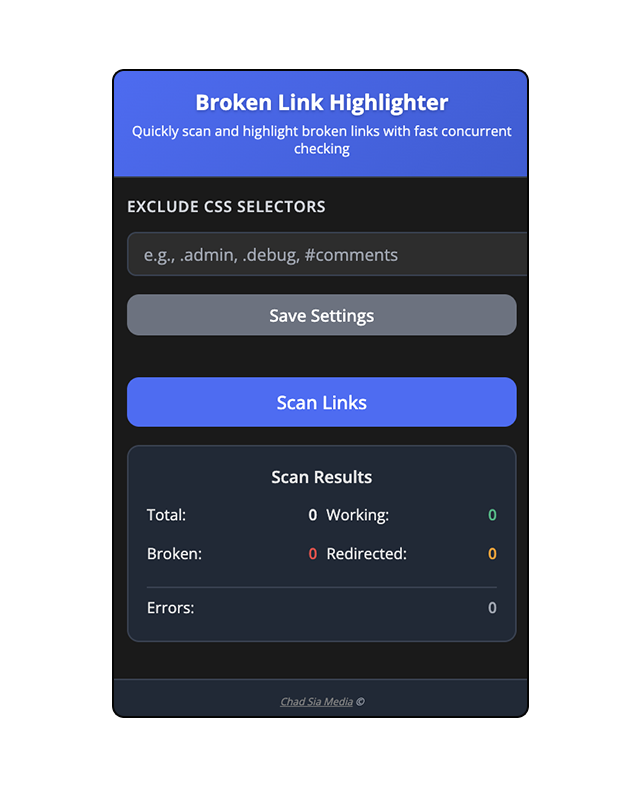
Scan any webpage for broken links in seconds. Fast concurrent checking, smart section detection, and color-coded results — all running locally in your browser.
v1.1 · 19KB · 100% Free · No Data Collection
Built for People Who Care About Working Links
Web Developers
Catch broken links before your clients do. Run a quick scan before every deployment or handoff.
Content Managers
Audit blog posts, landing pages, and documentation for dead links without leaving your browser.
SEO Professionals
Broken links hurt rankings. Find and fix them instantly on any page you’re auditing.
How It Works
1
Click the Extension
Navigate to any webpage and click the Broken Link Highlighter icon in your Chrome toolbar.
2
Scan the Page
Hit scan and watch it check up to 12 links simultaneously with real-time progress tracking.
3
Fix Broken Links
See color-coded results instantly. Red = broken, orange = redirect, green = working.
Features That Actually Matter
Concurrent Scanning
Checks up to 12 links simultaneously. A 200-link page done in seconds, not minutes.
Smart Section Detection
Auto-identifies headers, main content, footers, and sidebars using semantic HTML5 elements.
Color-Coded Results
Green = working Red = broken Orange = redirect
100% Private
All scanning runs locally in your browser. Zero data sent to servers. No accounts needed.
Custom Exclusion Filters
Skip admin panels or any URL patterns you don’t need checked. Settings persist across sessions.
Real-Time Progress
Percentage completion and current URL display in a compact dark-themed popup interface.
Stop Guessing.
Start Scanning.
Join web developers, content managers, and SEO professionals who use Broken Link Highlighter to keep their websites clean.
Only 19KB · Works on any website · No permissions abuse